
Call us now :07971191002
 Send Inquiry
Materialise Magics RP 3D Printing Software
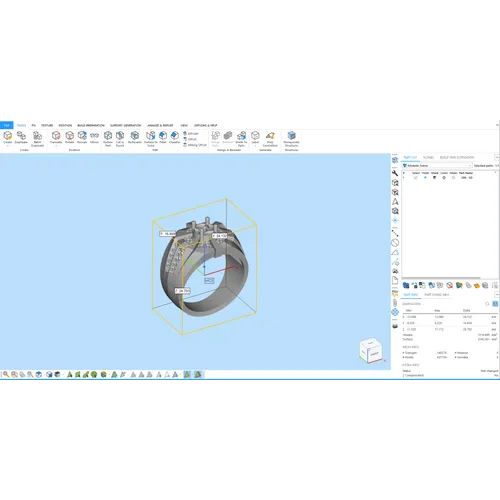

Materialise Magics RP 3D Printing Software Specification
- Compatible System
- Windows 7/8/10 (64-bit)
- Security Features
- License-based Access Control
- Usage
- Industrial and Commercial 3D Printing Applications
- Interface Type
- Graphical User Interface (GUI)
- Capacity (Person)
- Single or Multi-user
- Support System
- Online and Offline Technical Support
- Language Support
- Multilingual (including English)
- Type
- 3D Printing Software
- Application
- 3D Printing Model Preparation
- Software Version
- Latest Release (varies by license)
- Key Features
- Part Editing, Data Preparation, Model Repair, Support Generation, Nesting, and Analysis
- Installation Type
- Downloadable Installer
- System Requirements
- Intel Core i5 processor or higher, 8GB RAM minimum, 1GB free disk space, OpenGL-compatible GPU
- Integration Support
- Compatible with major 3D Printers and Additive Manufacturing Systems
- License Type
- Subscription or Perpetual
- File Format Support
- STL, OBJ, 3MF, AMF, and more
- Update Method
- Online Updates with Active License
Materialise Magics RP 3D Printing Software Trade Information
- Minimum Order Quantity
- 1 Piece
- Supply Ability
- 50 Pieces Per Month
- Delivery Time
- 7-10 Days
- Main Domestic Market
- All India
About Materialise Magics RP 3D Printing Software
The most powerful data and build preparation software.Materialise Magics simplifies data and build preparation with one easy-to-use solution. Whether you want precise control over your workflow or quick, optimized enhancements at the click of a button, Magics will guide you to success.
Seamless File Format Compatibility
Materialise Magics RP is engineered to support industry-standard file formats such as STL, OBJ, 3MF, and AMF, among others. This broad compatibility ensures users can import and export models efficiently, optimizing workflows regardless of originating CAD platforms or target printer systems. Multilingual support facilitates ease of use for users across India.
Powerful Model Preparation Tools
The software offers a comprehensive set of features, including model repair, support generation, nesting, and intuitive part editing. These tools enable engineers and manufacturers to prepare complex models for 3D printing with accuracy and speed, thus improving overall productivity and minimizing potential print failures.
Flexible Licensing and Continuous Updates
Materialise Magics RP provides both subscription and perpetual licensing options. With an active license, users receive online updates to ensure they benefit from the latest enhancements. Installation is simple via a downloadable installer, requiring only standard Windows hardware specifications commonly found in modern PCs.
FAQ's of Materialise Magics RP 3D Printing Software:
Q: How do I install Materialise Magics RP on my Windows system?
A: You can download the installer from the official Materialise website. The software supports Windows 7, 8, and 10 (64-bit). Ensure your system meets the minimum requirements: an Intel Core i5 processor or higher, 8GB RAM, 1GB free disk space, and an OpenGL-compatible GPU.Q: What types of 3D model file formats are supported by Magics RP?
A: Materialise Magics RP supports a wide range of file formats including STL, OBJ, 3MF, AMF, and several others. This enables easy importing and exporting for various 3D design and printer workflows.Q: When do software updates become available for Magics RP?
A: Updates are provided online whenever your active license is valid. Users receive notifications within the software, ensuring access to the latest features and improvements with minimal downtime.Q: Where can I get technical support for installation and usage issues?
A: Materialise offers both online and offline technical support channels. Users in India can reach out via the company's website or through local distributor and service partners for prompt assistance.Q: What is the process for preparing my model for 3D printing using Magics RP?
A: Begin by importing your 3D model. Utilize the software's editing, repair, and support generation tools to optimize your design. Use nesting and analysis features for efficient printing before exporting the finalized file to your 3D printer.Q: How does license-based access control benefit users?
A: License-based access ensures that only authorized users can operate the software, providing an added layer of security for sensitive projects and helping businesses maintain compliance with internal access policies.Q: Can Magics RP be integrated with my industrial 3D printer or manufacturing system?
A: Yes, Magics RP is compatible with major 3D printers and additive manufacturing systems, making it suitable for exporters, importers, manufacturers, service providers, and suppliers seeking streamlined model preparation across various hardware platforms.Tell us about your requirement

Price:
Quantity
Select Unit
- 50
- 100
- 200
- 250
- 500
- 1000+
Additional detail
Mobile number
Email


 Send Inquiry
Our Products
- SLA Resin
- SLA DLP 3D Printer
- DLP Resin
- DC Poly Resin
- DC Wax Resin
- GP LC Resin
- 3D Printer DLP Resin Tray
- Dental CAD CAM Machine
- Audiology 3D Printer
- DLP Platform
- DLP 3D Printer
- CAM 3D Printer
- Jewellery CAD CAM Machine
- G-Dent Resin
- M-Dent Resin
- GP SD Resin
- PRO-Flex Resin
- PRO-LB Resin
- CAM Machine Printing Software
- UV Oven
- Resin Tank
- Ultrasonic Cleaner
- Alpha 4K Jewellry Printer
- C-Dent Resin


412, Blue Rose Industrial Estate, Western Express Highway, Borivali East, Mumbai - 400066, Maharashtra, India

Mr. Anish Shah
(Director )
Mobile :07971191002
 Send Inquiry
 Send SMS
Developed and Managed by Infocom Network Private Limited.


